
Overview
Teams often understand that they need both a long-range view and an execution view, but they struggle with the handoff between them. One view becomes strategy theater while the other becomes a disconnected to-do board.
The fix is not to merge both views into one compromised system. The fix is to give each view a clear job and define the rhythm that connects them every quarter and every week.
Practical quarterly-planning notes
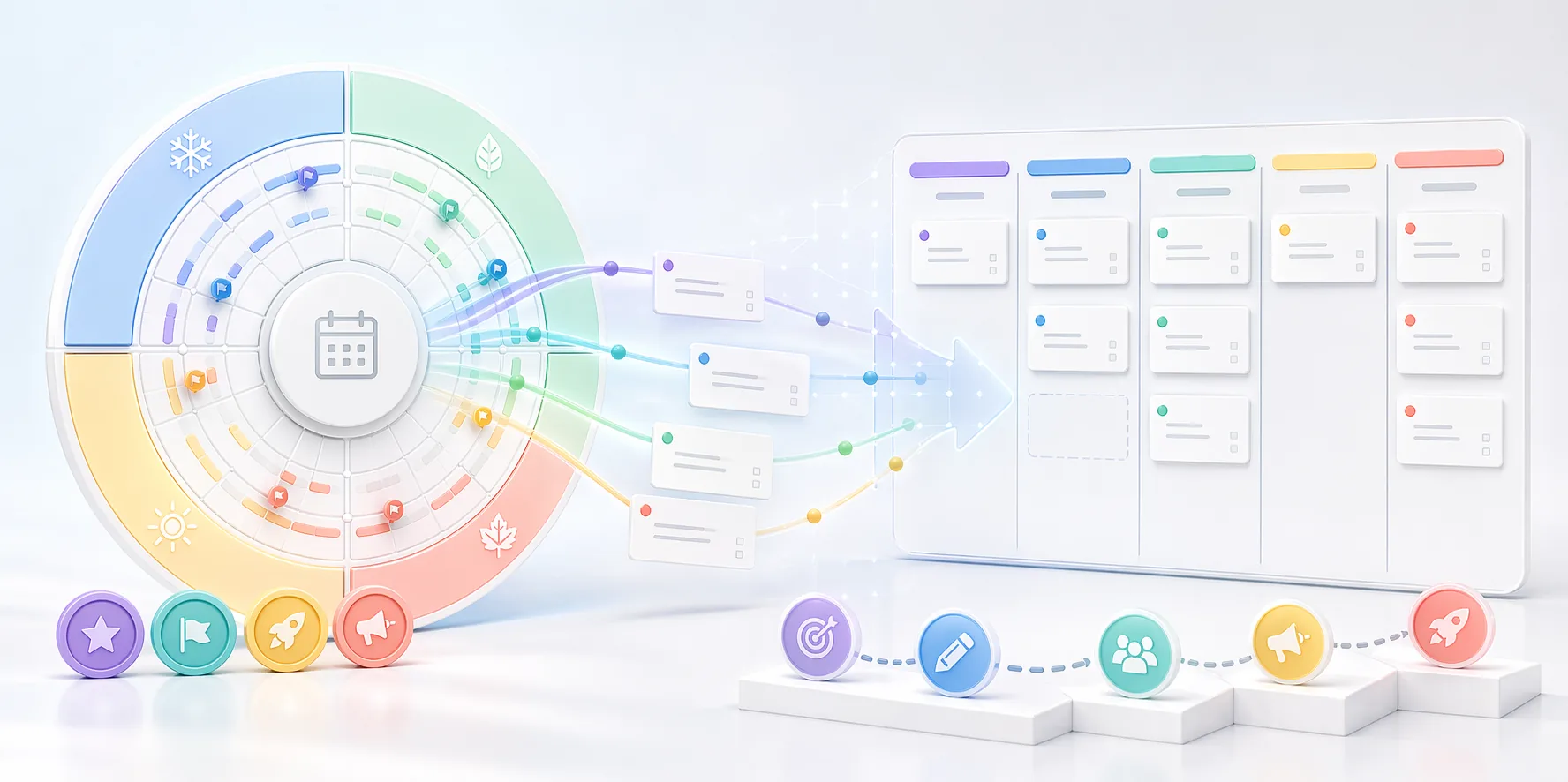
Quarterly planning fails when the strategic view and weekly work drift apart. The year wheel may show a convincing plan, but the Kanban board reveals whether the team is actually moving the right work at the right time.
A strong quarterly rhythm keeps the year wheel stable enough to guide timing, while allowing the active board to adapt as real work changes. That balance prevents planning from becoming either too rigid or too vague.
The bridge between the two views should be explicit. At the start of each week, the team should know which part of the quarter plan is now close enough to execute and which items should remain in the future view.
Quarterly planning checks
- Use the year wheel to map major timing and campaign pressure.
- Move only current or near-current work into Kanban.
- Review the connection between active work and quarterly goals every week.
- Update the long-range view at meaningful planning points, not after every task movement.
Who this is for
- Teams juggling quarterly goals and active weekly delivery.
- Operators who need a practical bridge between strategy timing and current work.
- Businesses with recurring programs that still require day-to-day execution discipline.
Step-by-step guidance
Step 1
Use the year wheel to frame the quarter before the quarter starts
Clarify the major timing moments, dependencies, and launch windows first. This gives the quarter a shape before the team starts pulling weekly tasks into motion.
Step 2
Pull only near-term work into Kanban
The active board should contain work that is ready for movement, ownership, and status tracking. Do not mirror every long-range idea on the Kanban board months before it is actionable.
Step 3
Review the connection weekly
A weekly check should ask whether the active board still supports the quarter framed on the year wheel. This keeps the short-term view aligned without forcing the team to revisit annual planning every day.
Step 4
Refresh the year wheel at quarter boundaries
The year wheel should be revisited when the planning horizon changes meaningfully, not every time a task moves. That keeps the long-range view stable enough to stay useful.
A quarter-to-week workflow
Start the quarter by placing major launches, content pushes, and operational deadlines on the year wheel. Then identify the first two to three weeks of work that must move now and create Kanban cards for those items only.
As the quarter unfolds, the weekly board changes often, but the wheel remains the timing reference. This gives the team flexibility without losing the bigger pattern they agreed to at the start.
Comparison or example section
The year wheel answers when the important things need to happen. Kanban answers what is moving right now. Teams work better when they stop asking each view to answer the other view's question.
Mistakes to avoid
- Copying every annual idea into Kanban long before it is actionable.
- Treating the year wheel as a live task board.
- Never checking whether weekly work still supports the quarter plan.
- Refreshing the long-range view so often that nobody relies on it anymore.
Planning help
Use the planning view that matches what you are doing
Planner works best when active work and longer-range timing are treated as two different jobs instead of being forced into one board.
Best for
- Teams managing ongoing execution in stages.
- Operators who need to plan annual campaigns or recurring programs.
- People who want a cleaner split between strategy timing and current workload.
How to use it well
Use lanes for work that is moving now: Choose the lane-based view when the important questions are what is next, what is blocked, and who owns the active work.
Use the year wheel for timing: Choose the year wheel when spacing, seasonality, launches, and recurring cycles matter more than day-to-day status updates.
Let the two views do different jobs: The year wheel gives you the bigger timing picture, while the lane planner handles the work that is actually in motion this week.
Keep weekly planning tied to the bigger plan: A simple rhythm works best: check the year view when you need timing context, then use the weekly board to run the work that is currently live.
FAQ
Do I need both views if my team is small?
Not always, but if the team must balance recurring annual timing with active weekly execution, having both views is often cleaner than forcing one view to do both jobs.
When should work move from the year wheel into Kanban?
When it is close enough to execution that ownership, sequencing, and progress now matter more than annual spacing.
What is the main benefit of combining them?
You keep long-range timing visible without losing the clarity needed to run active work week by week.